I suggest here from time to time that it is often human error rather than technical failures which cause data to be revealed inadvertantly. For every security loophole which is actually attributable to a system failure, you can find more which result from a thinking failure – a file is left in a cab, or a Government minister parades herself in front of the cameras with Cabinet secrets on display (see People the weakest link in data security).
Quite often the error has a mixed origin – a human misunderstands or misuses the technology with results varying from the merely embarassing to the disastrous. My concern about such events is that it is usually the technology which gets the blame.
I am obliged to Mark Dingle of Simmons & Simmons for drawing my attention to a good example of the genre. It concerns redaction, the task of rendering passages in documents illegible because they are privileged or otherwise non-disclosable. With paper this involved marking the passage heavily in black, or physically cutting out the passages in question.
It is not much less laborious to do this with electronic documents – one has to highlight the section and use the tools provided by the viewing application to obscure it. Often this is a two-stage process – one step to mark the passage and another to “burn” the marking into the image so that the recipient cannot simply reverse the marking action.
Acrobat PDF documents which had been publicly filed in a class action sex discrimination case involving General Electric had been redacted by imposing heavy black bars over passages which should have been hidden from public view. Users of the Federal Court’s filing system found that they could read the obscured passages by simply copying them and pasting them into Word. I suspect that they could just as easily have removed the black bars.
It is perfectly possible to redact PDFs permanently with the current version of Acrobat – there is a whole sub-menu devoted to the task.
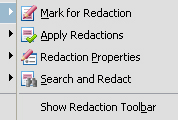
Who is to blame? Not Adobe – it was possible, albeit cumbersome, to blank a section of a document in earlier versions of Acrobat, and Adobe would only have been at fault if a designated method had failed to achieve the advertised result. The paralegals who did the redaction? Possibly, depending on their skill levels – if they were simply hired hands told to do a job in a particular way then they are presumably not to blame if that way did not achieve the desired result. It would be different if they were allegedly experts upon whose skill the law firm was entitled to rely – but not very different in terms of the lawyers’ responsibility.
One assumes that it is the firm which must take the responsibility, whoever they hired to do the actual redaction, and whether the paralegals were in house or external contractors. Lawyers might protest that they cannot be expected to understand the detailed workings (or non-workings) of a piece of software, but that is unlikely to help. Delegation might give them someone else to whom they can pass the damages bill, but it does not absolve them from the responsibility owed to the client.
That is not, however, a reason for not delegating tasks which cannot sensibly or economically be done by the lawyers themselves, nor is it a reason for not giving discovery electronically. The error made in this case is no different in effect to a botched redaction done with marker pen and scissors.
What would the reasonable person have done? All those involved – the lawyers, their paralegals and the court – seem to have been surprised by the ease with which the markings were by-passed, but that is hardly the test. Should they have thought to check a sample of the documents? I think they should.
The principle goes much wider than the failure of a particular process. Very large volumes of documents can be culled and filtered by two broad methods – you set an application to work on them with the help of people skilled in its use and informed as to the issues, or you set a number of humans to achieve the same task by eye. Both necessarily involve a degree of trust, and both are prone to failure. The key point is not whether the machines or humans are infallible but whether they were what the reasonable law firm would have used to achieve the desired result. The economics play a part in that – the cost should be proportionate to the value of the claim, and regard should be taken of any alternative ways of doing the same thing.
The complete failure of a specific process is rather different – and this redaction exercise must be judged a complete failure. It is relevant as well that the efficacy of the chosen method could easily have been checked, and it is also relevant that anyone who has worked with edited images would know to be alert to the potential for failure.
This example provides no reason for not using technology. It does, however, draw attention to the need to choose the right people to work with and to give them supervision commensurate with their skills and experience. There is nothing new in that. Nor, however, is there anything new in the idea that the use of Acrobat for redaction requires particular care.
See the Legal Technology article GE suffers a redaction disaster to which Mark Dingle referred me for more about this.